
LINUX | AWS | DEVOPS | PYTHON | DOCKER & KUBERNETES | TERRAFORM – COMBO Training in Bangalore
The Linux | Cloud | DevOps | Python | Docker & Kubernetes | Terraform Combo Program is a comprehensive, all-in-one training track designed for IT professionals and aspirants aiming to build expertise across multiple domains of modern infrastructure management and automation. This 6-month, 280-hour practical training offers a foundational-to-advanced roadmap covering operating systems, programming, cloud platforms, containers, and infrastructure as code (IaC). Whether you’re a beginner stepping into IT or a system/network/cloud engineer upgrading to a DevOps role, this program is tailored to make you deployment-ready, automation-efficient, and cloud-capable.
LINUX | AWS | DEVOPS | PYTHON | DOCKER & KUBERNETES | TERRAFORM – COMBO
Phase 1: Red Hat Linux Basics (RHCSA - Level 1) Duration: 40 Hours + Phase 1: Red Hat Linux Basics (RHCSA - Level 1) + Phase 2: Red Hat Linux Advanced (RHCE - Level 2) Duration: 40 Hours + Phase 2: Red Hat Linux Advanced (RHCE - Level 2) + Phase 3: Automation with Ansible (RHCE + DevOps Ready) Duration: 20 Hours + 1. Git, GitHub, GitLab, Bitbucket & 2. Jenkins (CI/CD Automation) + 3. Docker & 4. Kubernetes + 5. HashiCorp Vault & 6. ELK Stack (Elasticsearch, Logstash, Kibana) + 7. Argo CD (GitOps) & 8. Jira + 9. Nexus Repository Manager , 10. Helm , 11. Ansible + 12. Terraform , 13. Vault (Secret Management) ,14. Prometheus + 15. Grafana , 16. Azure DevOps / AWS CodePipeline, 17. ChatOps (Slack / Microsoft Teams) + Part 1: Docker & Container Fundamentals (15 Hours) + Part 2: Kubernetes – CKA Aligned (50+ Hours) + Part 2: Kubernetes – CKA Aligned (50+ Hours)
Tools you'll master
Enquire Now
Get course fees, batch dates & a callback
What you'll learn
Programme Overview
95 modules across Phase 1: Red Hat Linux Basics (RHCSA - Level 1) Duration: 40 Hours, Phase 1: Red Hat Linux Basics (RHCSA - Level 1), Phase 2: Red Hat Linux Advanced (RHCE - Level 2) Duration: 40 Hours, Phase 2: Red Hat Linux Advanced (RHCE - Level 2), Phase 3: Automation with Ansible (RHCE + DevOps Ready) Duration: 20 Hours, 1. Git, GitHub, GitLab, Bitbucket & 2. Jenkins (CI/CD Automation), 3. Docker & 4. Kubernetes, 5. HashiCorp Vault & 6. ELK Stack (Elasticsearch, Logstash, Kibana), 7. Argo CD (GitOps) & 8. Jira, 9. Nexus Repository Manager , 10. Helm , 11. Ansible, 12. Terraform , 13. Vault (Secret Management) ,14. Prometheus, 15. Grafana , 16. Azure DevOps / AWS CodePipeline, 17. ChatOps (Slack / Microsoft Teams), Part 1: Docker & Container Fundamentals (15 Hours), Part 2: Kubernetes – CKA Aligned (50+ Hours), Part 2: Kubernetes – CKA Aligned (50+ Hours) — a single, progressive learning arc from foundational concepts to real-world projects.
Phase 1: Red Hat Linux Basics (RHCSA - Level 1) Duration: 40 Hours
Master the core concepts and hands-on skills of Phase 1: Red Hat Linux Basics (RHCSA - Level 1) Duration: 40 Hours — from fundamentals to real-world application.
Phase 1: Red Hat Linux Basics (RHCSA - Level 1)
Master the core concepts and hands-on skills of Phase 1: Red Hat Linux Basics (RHCSA - Level 1) — from fundamentals to real-world application.
Phase 2: Red Hat Linux Advanced (RHCE - Level 2) Duration: 40 Hours
Master the core concepts and hands-on skills of Phase 2: Red Hat Linux Advanced (RHCE - Level 2) Duration: 40 Hours — from fundamentals to real-world application.
Phase 2: Red Hat Linux Advanced (RHCE - Level 2)
Master the core concepts and hands-on skills of Phase 2: Red Hat Linux Advanced (RHCE - Level 2) — from fundamentals to real-world application.
Phase 3: Automation with Ansible (RHCE + DevOps Ready) Duration: 20 Hours
Master the core concepts and hands-on skills of Phase 3: Automation with Ansible (RHCE + DevOps Ready) Duration: 20 Hours — from fundamentals to real-world application.
1. Git, GitHub, GitLab, Bitbucket & 2. Jenkins (CI/CD Automation)
Master the core concepts and hands-on skills of 1. Git, GitHub, GitLab, Bitbucket & 2. Jenkins (CI/CD Automation) — from fundamentals to real-world application.
Who is this programme for?
Whether you're starting from scratch, know some SQL, or are already writing code — this programme takes you from database fundamentals through Python programming to real-world data analysis.
Students & Freshers
Build a strong foundation in LINUX | AWS | DEVOPS | PYTHON | DOCKER & KUBERNETES | TERRAFORM – COMBO and gain practical, job-ready experience from day one.
Working Professionals
Upskill and combine complementary skills from multiple courses in one structured programme.
Career Switchers
Move into a new technical role with a single, structured path covering everything you need.
IT Professionals
Deepen your expertise and broaden your skill set with hands-on, practical training.
Course Curriculum
15 sections • 95 modules • 1004 topics
Phase 1: Red Hat Linux Basics (RHCSA - Level 1) Duration: 40 Hours
Programme Sections
15
100% Practical · Unlimited Doubt Sessions
Phase 1: Red Hat Linux Basics (RHCSA - Level 1)
Programme Sections
15
100% Practical · Unlimited Doubt Sessions
Phase 2: Red Hat Linux Advanced (RHCE - Level 2) Duration: 40 Hours
Programme Sections
15
100% Practical · Unlimited Doubt Sessions
Phase 2: Red Hat Linux Advanced (RHCE - Level 2)
Programme Sections
15
100% Practical · Unlimited Doubt Sessions
Phase 3: Automation with Ansible (RHCE + DevOps Ready) Duration: 20 Hours
Programme Sections
15
100% Practical · Unlimited Doubt Sessions
| Scenario | Challenge |
|---|---|
| Clone & configure 10 servers with specific user, network, and firewall rules | Scripting + CLI Config |
| One NIC drops intermittently on heavy load | NIC driver, interrupt affinity |
| Restore server boot with broken GRUB | Rescue ISO, chroot, grub2-install |
| Resize and remount /opt with zero downtime | LVM & live filesystem expansion |
| Configure server to auto reboot on kernel panic | Sysctl + grub parameter |
| Auto restart Apache if it crashes | systemd unit + watchdog |
| Identify failing NFS mounts affecting app startup | Logs, mount settings, fstab |
| Encrypt /data with LUKS and auto-unlock via keyfile | Secure keyfile integration |
| Block all IPs except internal subnets using firewalld | firewalld + zones |
| Perform kernel upgrade with fallback option | Keep old kernels, grub set default |
Hands-On Practice
- › Hands-on: • Create IAM policy to restrict S3 and EC2 access.
- › Hands-on: • Assign role to EC2 instance to access S3 bucket.
- › Hands-on: • Launch 2-tier app (web & DB) on EC2.
- › Hands-on: • Backup & restore an EC2 with AMI.
- › Hands-on: • Host a static website on S3 with custom domain.
- › Hands-on: • Configure lifecycle policy to move objects to Glacier.
Hands-On Practice
- › Hands-on: • Launch a VPC with 2-tier architecture.
- › Hands-on: • Configure Route 53 with custom domain and failover policy.
- › Hands-on: • Create CPU alarm for EC2.
- › Hands-on: • Monitor login activities via CloudTrail.
- › Hands-on: • Deploy and connect to RDS from EC2.
- › Hands-on: • Restore RDS from snapshot.
Hands-On Practice
- › Hands-on: • Write CLI script to create EC2 and attach volume.
- › Hands-on: • Use SSM to patch multiple EC2s.
- › Hands-on: • Create HA web tier with ALB + ASG.
- › Hands-on: • Configure scaling policy based on CPU.
| Task Domain | L1 | L2 | L3 |
|---|---|---|---|
| Monitoring | Basic checks, alerts | Setup alarms, log groups | Custom dashboards, anomaly detection |
| EC2/Infrastructure | Launch, stop, reboot | Configure ASG, ELB, backups | Architect HA, Multi-AZ/region apps |
| IAM | Create users, roles | Write/manage IAM policies | IAM Federation, SCP |
| Networking | Security groups | VPC/Subnets, VPN config | Multi-region, Direct Connect |
| Storage (S3/EBS/EFS) | Upload/download | Lifecycle policies, encryption | Storage tiering, cross-region replication |
| Automation | Manual execution | AWS CLI scripting, SSM | Terraform, CloudFormation |
| Backup & DR | Snapshots, restore | Backup policies, automation | DR design, cross-region failover |
| Compliance/Security | Basic patching | GuardDuty, Config rules | Org-wide guardrails, Security Hub |
| Cost Management | NA | Budget alerts | Cost optimization, reserved planning |
1. Git, GitHub, GitLab, Bitbucket & 2. Jenkins (CI/CD Automation)
Programme Sections
15
100% Practical · Unlimited Doubt Sessions
3. Docker & 4. Kubernetes
Programme Sections
15
100% Practical · Unlimited Doubt Sessions
5. HashiCorp Vault & 6. ELK Stack (Elasticsearch, Logstash, Kibana)
Programme Sections
15
100% Practical · Unlimited Doubt Sessions
7. Argo CD (GitOps) & 8. Jira
Programme Sections
15
100% Practical · Unlimited Doubt Sessions
9. Nexus Repository Manager , 10. Helm , 11. Ansible
Programme Sections
15
100% Practical · Unlimited Doubt Sessions
12. Terraform , 13. Vault (Secret Management) ,14. Prometheus
Programme Sections
15
100% Practical · Unlimited Doubt Sessions
15. Grafana , 16. Azure DevOps / AWS CodePipeline, 17. ChatOps (Slack / Microsoft Teams)
Programme Sections
15
100% Practical · Unlimited Doubt Sessions
Hands-On Practice
- › hands-on labs using Docker, containerd, and Kubernetes.
Part 1: Docker & Container Fundamentals (15 Hours)
Programme Sections
15
100% Practical · Unlimited Doubt Sessions
Part 2: Kubernetes – CKA Aligned (50+ Hours)
Programme Sections
15
100% Practical · Unlimited Doubt Sessions
Part 2: Kubernetes – CKA Aligned (50+ Hours)
Programme Sections
15
100% Practical · Unlimited Doubt Sessions
Hands-On Practice
- › Hands-on: • Install Terraform and deploy a test resource in AWS
- › Hands-on: • Create AWS VPC, subnet, and EC2 instance using variables and outputs
- › Hands-on: • Use AWS AMI as a data source and deploy an EC2 instance
- › Hands-on: • Output public IP and instance tags
Hands-On Practice
- › Hands-on: • Configure remote backend with AWS S3 + DynamoDB locking
- › Hands-on: • Deploy multiple EC2s using count and for_each with dynamic tagging
- › Hands-on: • Create reusable VPC + EC2 + S3 module
- › Hands-on: • Deploy 3-tier architecture using modules
Hands-On Practice
- › Hands-on: • Install Apache on EC2 via remote-exec
- › Hands-on: • Prevent resource destruction using lifecycle
- › Hands-on: • Connect TFC to GitHub and auto-deploy on changes
- › Hands-on: • Deploy identical infrastructure in AWS, Azure, and GCP
Hands-On Practice
- › Hands-on: • Create Jenkins pipeline to deploy Terraform infrastructure
- › Hands-on: • Pull secrets from Vault to provision EC2
- › Hands-on: • Write policies to prevent open S3 buckets
- › Hands-on: • Lint Terraform code and fix errors
- › Hands-on: • Resolve broken module dependency
- › Hands-on: • Refactor spaghetti Terraform codebase
Tools & Technologies
Every tool and library listed here is installed, configured and used in a hands-on lab session.
Linux
Covered in Phase 1: Red Hat Linux Basics (RHCSA - Level 1) Duration: 40 Hours
Linux
Covered in Phase 1: Red Hat Linux Basics (RHCSA - Level 1)
Networking
Covered in Phase 1: Red Hat Linux Basics (RHCSA - Level 1)
Bash
Covered in Phase 2: Red Hat Linux Advanced (RHCE - Level 2) Duration: 40 Hours
Phase 2: Red Hat Linux Advanced (RHCE - Level 2)
Covered in Phase 2: Red Hat Linux Advanced (RHCE - Level 2)
AWS
Covered in Phase 3: Automation with Ansible (RHCE + DevOps Ready) Duration: 20 Hours
Jenkins
Covered in Phase 3: Automation with Ansible (RHCE + DevOps Ready) Duration: 20 Hours
Git
Covered in Phase 3: Automation with Ansible (RHCE + DevOps Ready) Duration: 20 Hours
Ansible
Covered in Phase 3: Automation with Ansible (RHCE + DevOps Ready) Duration: 20 Hours
Jenkins
Covered in 1. Git, GitHub, GitLab, Bitbucket & 2. Jenkins (CI/CD Automation)
Git
Covered in 1. Git, GitHub, GitLab, Bitbucket & 2. Jenkins (CI/CD Automation)
GitHub
Covered in 1. Git, GitHub, GitLab, Bitbucket & 2. Jenkins (CI/CD Automation)
Bitbucket
Covered in 1. Git, GitHub, GitLab, Bitbucket & 2. Jenkins (CI/CD Automation)
Docker
Covered in 3. Docker & 4. Kubernetes
Kubernetes
Covered in 3. Docker & 4. Kubernetes
Elasticsearch
Covered in 5. HashiCorp Vault & 6. ELK Stack (Elasticsearch, Logstash, Kibana)
Kubernetes
Covered in 5. HashiCorp Vault & 6. ELK Stack (Elasticsearch, Logstash, Kibana)
Jenkins
Covered in 5. HashiCorp Vault & 6. ELK Stack (Elasticsearch, Logstash, Kibana)
Ansible
Covered in 5. HashiCorp Vault & 6. ELK Stack (Elasticsearch, Logstash, Kibana)
JIRA
Covered in 7. Argo CD (GitOps) & 8. Jira
Git
Covered in 7. Argo CD (GitOps) & 8. Jira
Kubernetes
Covered in 7. Argo CD (GitOps) & 8. Jira
CI/CD
Covered in 7. Argo CD (GitOps) & 8. Jira
Ansible
Covered in 9. Nexus Repository Manager , 10. Helm , 11. Ansible
Jenkins
Covered in 9. Nexus Repository Manager , 10. Helm , 11. Ansible
Git
Covered in 9. Nexus Repository Manager , 10. Helm , 11. Ansible
Kubernetes
Covered in 9. Nexus Repository Manager , 10. Helm , 11. Ansible
Terraform
Covered in 12. Terraform , 13. Vault (Secret Management) ,14. Prometheus
Azure
Covered in 12. Terraform , 13. Vault (Secret Management) ,14. Prometheus
Prometheus
Covered in 12. Terraform , 13. Vault (Secret Management) ,14. Prometheus
Jenkins
Covered in 12. Terraform , 13. Vault (Secret Management) ,14. Prometheus
Python
Covered in 15. Grafana , 16. Azure DevOps / AWS CodePipeline, 17. ChatOps (Slack / Microsoft Teams)
Docker
Covered in 15. Grafana , 16. Azure DevOps / AWS CodePipeline, 17. ChatOps (Slack / Microsoft Teams)
Kubernetes
Covered in 15. Grafana , 16. Azure DevOps / AWS CodePipeline, 17. ChatOps (Slack / Microsoft Teams)
AWS
Covered in 15. Grafana , 16. Azure DevOps / AWS CodePipeline, 17. ChatOps (Slack / Microsoft Teams)
Docker
Covered in Part 1: Docker & Container Fundamentals (15 Hours)
Node.js
Covered in Part 1: Docker & Container Fundamentals (15 Hours)
Python
Covered in Part 1: Docker & Container Fundamentals (15 Hours)
MySQL
Covered in Part 1: Docker & Container Fundamentals (15 Hours)
Kubernetes
Covered in Part 2: Kubernetes – CKA Aligned (50+ Hours)
Networking
Covered in Part 2: Kubernetes – CKA Aligned (50+ Hours)
MySQL
Covered in Part 2: Kubernetes – CKA Aligned (50+ Hours)
Terraform
Covered in Part 2: Kubernetes – CKA Aligned (50+ Hours)
AWS
Covered in Part 2: Kubernetes – CKA Aligned (50+ Hours)
Kubernetes
Covered in Part 2: Kubernetes – CKA Aligned (50+ Hours)
Jenkins
Covered in Part 2: Kubernetes – CKA Aligned (50+ Hours)
You don't just learn LINUX | AWS | DEVOPS | PYTHON | DOCKER & KUBERNETES | TERRAFORM – COMBO. You apply it.
A combined capstone project across all 15 sections — the same way you'd apply these skills on the job.
LINUX | AWS | DEVOPS | PYTHON | DOCKER & KUBERNETES | TERRAFORM – COMBO Capstone Project
→Phase 1: Red Hat Linux Basics (RHCSA - Level 1) Duration: 40 Hours
→Phase 1: Red Hat Linux Basics (RHCSA - Level 1)
→Phase 2: Red Hat Linux Advanced (RHCE - Level 2) Duration: 40 Hours
→Phase 2: Red Hat Linux Advanced (RHCE - Level 2)
→Phase 3: Automation with Ansible (RHCE + DevOps Ready) Duration: 20 Hours
→1. Git, GitHub, GitLab, Bitbucket & 2. Jenkins (CI/CD Automation)
→3. Docker & 4. Kubernetes
→5. HashiCorp Vault & 6. ELK Stack (Elasticsearch, Logstash, Kibana)
→7. Argo CD (GitOps) & 8. Jira
→9. Nexus Repository Manager , 10. Helm , 11. Ansible
→12. Terraform , 13. Vault (Secret Management) ,14. Prometheus
→15. Grafana , 16. Azure DevOps / AWS CodePipeline, 17. ChatOps (Slack / Microsoft Teams)
→Part 1: Docker & Container Fundamentals (15 Hours)
→Part 2: Kubernetes – CKA Aligned (50+ Hours)
→Part 2: Kubernetes – CKA Aligned (50+ Hours)
Apply everything you learn across Phase 1: Red Hat Linux Basics (RHCSA - Level 1) Duration: 40 Hours, Phase 1: Red Hat Linux Basics (RHCSA - Level 1), Phase 2: Red Hat Linux Advanced (RHCE - Level 2) Duration: 40 Hours, Phase 2: Red Hat Linux Advanced (RHCE - Level 2), Phase 3: Automation with Ansible (RHCE + DevOps Ready) Duration: 20 Hours and 10 more to one real-world project
Bring together every course in this programme into a single, end-to-end project — the same way you would apply these combined skills on the job.
Hands-on Practice Areas
All projects go directly into your portfolio & resume — reviewed by mentors before you graduate.
See Sample Project ReportsUpcoming Batches
Why Radical Technologies
- Highly practical oriented training
- Installation support on your system
- 24/7 Email and Phone support
- 100% Placement Assistance
- Global Certification Preparation
- Trainer-Student Interactive Portal
- Assignments and Projects by Mentors
- Weekend / Weekdays / Morning / Evening batches
- 80:20 Practical and Theory ratio
- Real-life Case Studies
- Easy make-up for missed sessions
- PSI | Kryterion | Redhat Test Centers
- Lifetime Video Classroom Access (coming soon)
- Resume Prep and Mock Interviews
- Learn 300+ courses at your own time
- 50,000+ Satisfied Learners
- Course Completion Certificate
- Practical Labs available
- Mentor Support available
- Doubt Clearing Session available
- 10% Discounted Global Certification
Like the Curriculum? Let's Get Started
Join 50,000+ students already enrolled at Radical Technologies
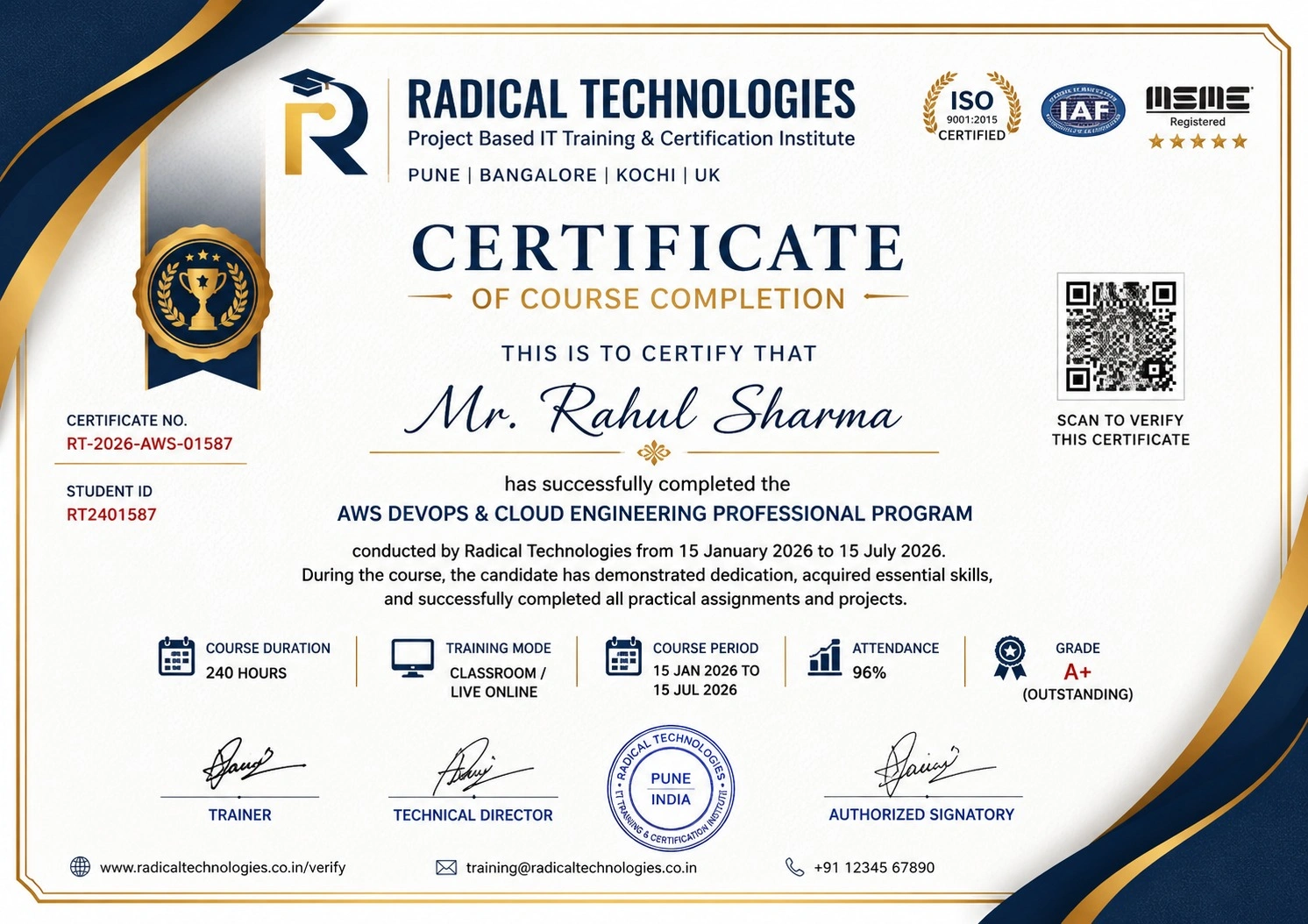
Global Certification
Radical Technologies is the leading IT certification institute in Bangalore, offering globally recognized certifications across various domains. With expert trainers and comprehensive materials, we ensure students gain in-depth knowledge and hands-on experience to excel in their careers. Our certification programs are tailored to meet industry standards — from cloud technologies to data science — empowering individuals to stay ahead in the ever-evolving tech landscape.
Career Services
At Radical Technologies, we are committed to your success beyond the classroom. Our 100% Job Assistance program ensures that you are not only equipped with industry-relevant skills but also guided through the job placement process. With personalised resume building, interview preparation, and access to our extensive network of hiring partners, we help you take the next step confidently into your IT career.
Career Support
Join our Brush-up Session & get support until you find a job!
Get StartedRadical Learning Eco-System
Exam Simulator
Cloud SandBox
Hands-on Cloud Lab
Developer Coding Ground
Student Reviews
Course Rating





Our Alumni Work At













Linux | Cloud | Devops | Python | Docker & Kubernetes | Terraform – Combo Course Certification With Training In Bangalore
Related Combo Courses
Combo Course In Other Cities
Online Batches Available For These Areas
Ambegaon Budruk | Aundh | Baner | Bavdhan Khurd | Bavdhan Budruk | Balewadi | Shivajinagar | Bibvewadi | Bhugaon | Bhukum | Dhankawadi | Dhanori | Dhayari | Erandwane | Fursungi | Ghorpadi | Hadapsar | Hingne Khurd | Karve Nagar | Kalas | Katraj | Khadki | Kharadi | Kondhwa | Koregaon Park | Kothrud | Lohagaon | Manjri | Markal | Mohammed Wadi | Mundhwa | Nanded | Parvati Hill | Panmala | Pashan | Pirangut | Shivane | Sus | Undri | Vishrantwadi | Vitthalwadi | Vadgaon Khurd | Vadgaon Budruk | Vadgaon Sheri | Wagholi | Wanwadi | Warje | Yerwada | Akurdi | Bhosari | Chakan | Charholi Budruk | Chikhli | Chimbali | Chinchwad | Dapodi | Dehu Road | Dighi | Dudulgaon | Hinjawadi | Kalewadi | Kasarwadi | Maan | Moshi | Phugewadi | Pimple Gurav | Pimple Nilakh | Pimple Saudagar | Pimpri | Ravet | Rahatani | Sangvi | Talawade | Tathawade | Thergaon | Wakad
LINUX | AWS | DEVOPS | PYTHON | DOCKER & KUBERNETES | TERRAFORM – COMBO
Phase 1: Red Hat Linux Basics (RHCSA - Level 1) Duration: 40 Hours + Phase 1: Red Hat Linux Basics (RHCSA - Level 1) + Phase 2: Red Hat Linux Advanced (RHCE - Level 2) Duration: 40 Hours + Phase 2: Red Hat Linux Advanced (RHCE - Level 2) + Phase 3: Automation with Ansible (RHCE + DevOps Ready) Duration: 20 Hours + 1. Git, GitHub, GitLab, Bitbucket & 2. Jenkins (CI/CD Automation) + 3. Docker & 4. Kubernetes + 5. HashiCorp Vault & 6. ELK Stack (Elasticsearch, Logstash, Kibana) + 7. Argo CD (GitOps) & 8. Jira + 9. Nexus Repository Manager , 10. Helm , 11. Ansible + 12. Terraform , 13. Vault (Secret Management) ,14. Prometheus + 15. Grafana , 16. Azure DevOps / AWS CodePipeline, 17. ChatOps (Slack / Microsoft Teams) + Part 1: Docker & Container Fundamentals (15 Hours) + Part 2: Kubernetes – CKA Aligned (50+ Hours) + Part 2: Kubernetes – CKA Aligned (50+ Hours)
Tools you'll master