
AWS Certified Solutions Architect – Associate
Basic → Advanced AWS Solution Architect syllabus, designed to make you a Job-Ready Advanced Cloud Engineer. This is much deeper than the AWS SAA-C03 exam syllabus — it includes real-time enterprise scenarios, architectures, troubleshooting, DevOps + Cloud integrations, and hands-on labs used in top MNCs. Will be also covering Fundamentals of Linux and Devops and Python Scripting along with this course .

AWS Certified Solutions Architect – Associate
IT Training Programme
100% placement assistance
Enquire Now
Get course fees, batch dates & a callback
What you'll learn
Programme Overview
26 sections covering the complete curriculum — a single, progressive learning arc.
Foundations & Core Concepts
Get hands-on with the fundamentals and architecture — the building blocks for everything that follows.
Hands-On Practical Training
Work through real exercises and assignments designed to mirror what you will do on the job.
Real-World Projects
Apply what you have learned to end-to-end projects that go straight into your portfolio.
Advanced Techniques
Go beyond the basics with advanced concepts, integrations and production-grade practices.
Ecosystem Integration
Understand how this technology connects with the broader tools and platforms used in the industry.
Performance & Interview Prep
Master optimization techniques and prepare for the technical interview questions employers actually ask.
Who is this programme for?
Whether you're already writing code, working with data, or supporting applications today — this programme is built to take you into a -CLOUD COMPUTING - AWS role.
Software Developers
Engineers who want to add this skill set to their toolkit
Analysts & Consultants
Professionals moving into a more technical, hands-on role
IT Professionals
System admins and support engineers upskilling into a new domain
Fresh Graduates
CS/IT graduates aiming for a job-ready technical role
Course Curriculum
26 sections • 404 lessons • 10 weeks
Jump to Section
Total Duration
10 weeks
100% Practical · Unlimited Doubt Sessions
01 Prerequisites
02 Fundamentals
03 Module 1: Cloud Basics & AWS Foundation (4–5 Hours)
Topics
Labs
- ›Create AWS account
- ›Configure Billing Alerts
- ›IAM Users + MFA setup
04 Module 2: Identity & Access Management (IAM) – Deep Dive (3–4 Hours)
Topics
Labs
- ›Create IAM roles with cross-account access
- ›Create SCPs to restrict admin users
- ›IAM Access Analyzer to detect over-permissioned roles
05 Module 3: VPC & Networking (Advanced Level) – 8–10 Hours
VPC Core Concepts
Advanced VPC
Labs
- ›Build multi-AZ VPC
- ›Create PrivateLink endpoint for internal apps
- ›Connect 2 VPCs using peering
- ›Configure Transit Gateway multi-VPC communication
Job-Oriented Scenarios
- ›“Intermittent packet loss from private subnet” troubleshooting
- ›“Application reachable via IGW but not via internal LB”
- ›“Hybrid network outage RCA”
06 Module 4: EC2 & Compute Mastery (5–7 Hours)
Topics
Labs
- ›Create Auto-Scaling group with ALB
- ›Configure NLB + PrivateLink
- ›EC2 rescue for failed boot
- ›AMI building & automation
Job Scenarios
- ›EC2 instance CPU spikes troubleshooting
- ›ASG not scaling during high load
- ›Root volume corruption recovery
07 Module 5: Storage & Databases (5–6 Hours)
Storage
Databases
Labs
- ›S3 bucket policy & encryption
- ›Deploy Aurora with automatic failover
- ›EFS for web servers in ASG
- ›DynamoDB with Autoscaling
Job Scenarios
- ›RDS failover troubleshooting
- ›S3 public access blocker bypass recovery
- ›DynamoDB throttling issues
08 Module 6: Containers, Serverless & Modern Architecture (5–7 Hours)
Containers
Serverless
Labs
- ›Deploy a serverless API (API GW → Lambda → DynamoDB)
- ›Deploy ECS service with ALB
- ›Build CI/CD for ECR + ECS
Job Scenarios
- ›Lambda timeout debugging
- ›ECS task stuck in PENDING
09 Module 7: Infrastructure as Code – Terraform & CloudFormation (4–6 Hours)
Topics
Labs
- ›Build VPC using Terraform
- ›Automate ALB + ASG infra using IaC
- ›Migrate manual resources to Terraform
Job Scenarios
- ›Terraform state corruption fix
- ›Drift between manual & IaC deployment
10 Module 8: Monitoring & Logging (3–4 Hours)
Topics
Labs
- ›Create metric alarms for ASG & RDS
- ›Centralized logging using CloudWatch + OpenSearch
- ›Trace application latency using X-Ray
Scenarios
- ›Disk burst on EC2 leading to slow website
- ›Lambda cold-start monitoring
11 Module 9: Security, Compliance & Governance (5–6 Hours)
Topics
Labs
- ›Encrypt EC2, RDS, and S3 with KMS
- ›WAF rules for OWASP Top 10
- ›Enable GuardDuty and detect threats
Scenarios
- ›Breached IAM keys rotation & containment
- ›S3 accidental public exposure fix
12 Module 10: High Availability, DR & Migration Strategies (6–8 Hours)
Topics
Labs
- ›Multi-Region failover using Route53
- ›DMS for database migration
- ›Lift & Shift migration of on-prem application
Scenarios
- ›Application outage in one region – failover to another
- ›Database migration with zero downtime
13 Linux Fundamentals for Cloud Engineers
1. Linux & Cloud Overview
2. Linux Installation & Access (Cloud Context)
Hands-On
- ›SSH to cloud Linux VM
- ›Understand directory structure
3. Linux File System & Commands (Must-Know)
4. Users, Groups & Permissions
Hands-On
- ›Create cloud admin user
- ›Configure sudo access
5. Package Management
Hands-On
- ›Install Apache / Nginx
- ›Verify running services
6. Process & Service Management
7. Networking Basics (Cloud-Relevant)
8. Storage & Disk Management
Hands-On
- ›Attach new disk & mount
- ›Extend file system
9. Logs & Troubleshooting
10. Automation Basics for Cloud
11. Security Basics for Cloud Linux
12. Linux for DevOps & Cloud Tools
Real-World Cloud Scenarios
- ›VM not reachable via SSH
- ›Disk full on cloud VM
- ›Service not starting after reboot
- ›High CPU usage troubleshooting
- ›Securing production Linux VM
14 DevOps Fundamentals for Cloud Engineers
1. DevOps for Cloud Engineers (Mindset + Reality)
2. Cloud-Native DevOps Lifecycle
3. Version Control (Mandatory Skill)
Hands-On
- ›Create repo
- ›Push infra/config files
- ›Rollback using Git
4. CI/CD Fundamentals (Cloud Perspective)
Demo
5. Containers for Cloud Engineers
Hands-On
- ›Run containerized application
- ›Push image to registry (demo)
6. Kubernetes Fundamentals (Cloud-Native Ops)
7. Infrastructure as Code (IaC)
Use Case
8. Monitoring, Logging & Reliability
9. Security in Cloud DevOps (DevSecOps)
10. Cost, Governance & Automation
11. Real-World Cloud DevOps Scenarios
- ›CI/CD pipeline failure troubleshooting
- ›Application not reachable after deployment
- ›Kubernetes pod crash loop
- ›Infrastructure drift detection
- ›Rollback strategies in production
Tools Covered (Concept + Demo)
15 Python for System Administrators
Objective
16 Module 1: Introduction to Python (1 Hour)
Topics
Lab
- ›Write a script to print: Hostname / Current date / System uptime
Assignment
- ›Create a Python script that displays: CPU usage / Memory usage / Disk usage
17 Module 2: Python Basics for Automation (2 Hours)
Topics
Lab
- ›Write scripts to: Check disk space / List running processes
Assignment
- ›Create a script that monitors disk space and alerts when usage exceeds 80%.
18 Module 3: File Handling and System Interaction (2 Hours)
Topics
Lab
- ›Create script to analyze Linux system logs.
Assignment
- ›Write Python script to: Check log files / Detect error messages / Generate report
19 Module 4: Automation Scripts for Linux Admins (2 Hours)
Topics
Mini Project
20 Hands-on Labs
Intermediate
Advanced
21 Assignments
Intermediate
Advanced
22 Mini Projects
Intermediate
Advanced
23 Capstone Project
Intermediate
Advanced
24 Troubleshooting Scenarios
Intermediate
Advanced
25 Best Practices
26 Latest Industry Topics
Tools & Technologies
Every tool listed here is installed, configured and used in a hands-on lab session.
AWS Management Console
AWS CLI
AWS CloudShell
CloudFormation
AWS CDK
Terraform
Docker
Kubernetes (Amazon EKS)
Git
GitHub
Jenkins
Visual Studio Code
AWS Cloud9
Postman
Amazon CloudWatch
AWS CloudTrail
AWS Config
AWS Systems Manager
Amazon EventBridge
AWS Backup
Real-Time Job Oriented Scenarios
- Provision new cloud infrastructure.
- Migrate on-premises applications to AWS.
- Secure AWS accounts using IAM.
- Configure Load Balancers.
- Expand storage for applications.
- Configure monitoring.
- Design highly available architectures.
- Build disaster recovery solutions.
- Implement hybrid cloud connectivity.
- Perform cloud migration.
- Optimize AWS costs.
- Secure enterprise cloud environments.
- Design scalable production systems.
- Troubleshoot networking issues.
- Configure multi-region failover.
- Architect cloud-native applications.
Skills You Will Gain
- Understand AWS Global Infrastructure
- Design Highly Available Cloud Architectures
- Deploy Scalable Web Applications
- Implement Networking and Security Solutions
- Design Storage & Database Architectures
- Configure Monitoring & Disaster Recovery
- Implement Cost Optimization Strategies
- Build Multi-Tier Enterprise Applications
- Prepare for AWS Certified Solutions Architect – Associate (SAA-C03)
- Become Job-Ready as an AWS Cloud Architect
- Real-world Solution Architect skills
- Enterprise Architecture Design capability
- Advanced VPC / Networking mastery
- Serverless + Containers production-level skills
- IaC automation (Terraform + CloudFormation)
- DR, Migration, HA expertise
- Troubleshooting experience (L1 → L3)
- Job-oriented tasks performed in MNCs
You don't just learn AWS Certified Solutions Architect – Associate. You ship it.
Three major projects, each mirroring how production teams actually work — from guided foundations to a portfolio-ready capstone.
Guided Foundation Project
→Requirement Analysis
→Guided Implementation
→Mentor Review
→Iteration
Apply the fundamentals in a structured, mentor-reviewed project
Take the core concepts from the first half of the curriculum and apply them to a realistic scenario, with guidance and feedback from your mentor at every step.
Applied Practice Project
→Scenario Design
→Independent Build
→Testing & Validation
→Peer Review
Build a more independent project mirroring real production scenarios
Work through a project that combines multiple concepts from the curriculum, closer to how work is actually structured on the job — less hand-holding, more ownership.
Capstone Project
→Planning
→End-to-End Build
→Review & Refinement
→Presentation
Take a project from requirements to a polished, portfolio-ready deliverable
Your final project — plan, build, test and present a complete solution using everything covered in the curriculum, reviewed by mentors before you graduate.
All 3 projects go directly into your portfolio & resume — reviewed by mentors before you graduate.
See Sample Project ReportsUpcoming Batches
| Start Date | Time | Day | Mode | Enroll |
|---|---|---|---|---|
| 28/11/2026 | 09:00 AM – 11:00 AM | Weekend | Online | Enroll Now |
| 28/11/2026 | 10:30 AM – 12:30 PM | Weekend | Online | Enroll Now |
| 28/11/2026 | 02:00 PM – 04:00 PM | Weekend | Online | Enroll Now |
| 30/11/2026 | 05:00 PM – 06:00 PM | Weekday | Online | Enroll Now |
| 30/11/2026 | 07:00 PM – 08:00 PM | Weekday | Online | Enroll Now |
| 30/11/2026 | 08:00 PM – 09:00 PM | Weekday | Online | Enroll Now |
| 05/12/2026 | 09:00 AM – 11:00 AM | Weekend | Online | Enroll Now |
| 05/12/2026 | 10:30 AM – 12:30 PM | Weekend | Online | Enroll Now |
| 05/12/2026 | 02:00 PM – 04:00 PM | Weekend | Online | Enroll Now |
| 14/12/2026 | 02:00 PM – 04:00 PM | Weekend | Online | Enroll Now |
Why Radical Technologies
- Highly practical oriented training
- Installation support on your system
- 24/7 Email and Phone support
- 100% Placement Assistance
- Global Certification Preparation
- Trainer-Student Interactive Portal
- Assignments and Projects by Mentors
- Weekend / Weekdays / Morning / Evening batches
- 80:20 Practical and Theory ratio
- Real-life Case Studies
- Easy make-up for missed sessions
- PSI | Kryterion | Redhat Test Centers
- Lifetime Video Classroom Access (coming soon)
- Resume Prep and Mock Interviews
- Learn 300+ courses at your own time
- 50,000+ Satisfied Learners
- Course Completion Certificate
- Practical Labs available
- Mentor Support available
- Doubt Clearing Session available
- 10% Discounted Global Certification
Like the Curriculum? Let's Get Started
Join 50,000+ students already enrolled at Radical Technologies
Global Certification
Radical Technologies is the leading IT certification institute in Kochi, offering globally recognized certifications across various domains. With expert trainers and comprehensive materials, we ensure students gain in-depth knowledge and hands-on experience to excel in their careers. Our certification programs are tailored to meet industry standards — from cloud technologies to data science — empowering individuals to stay ahead in the ever-evolving tech landscape.
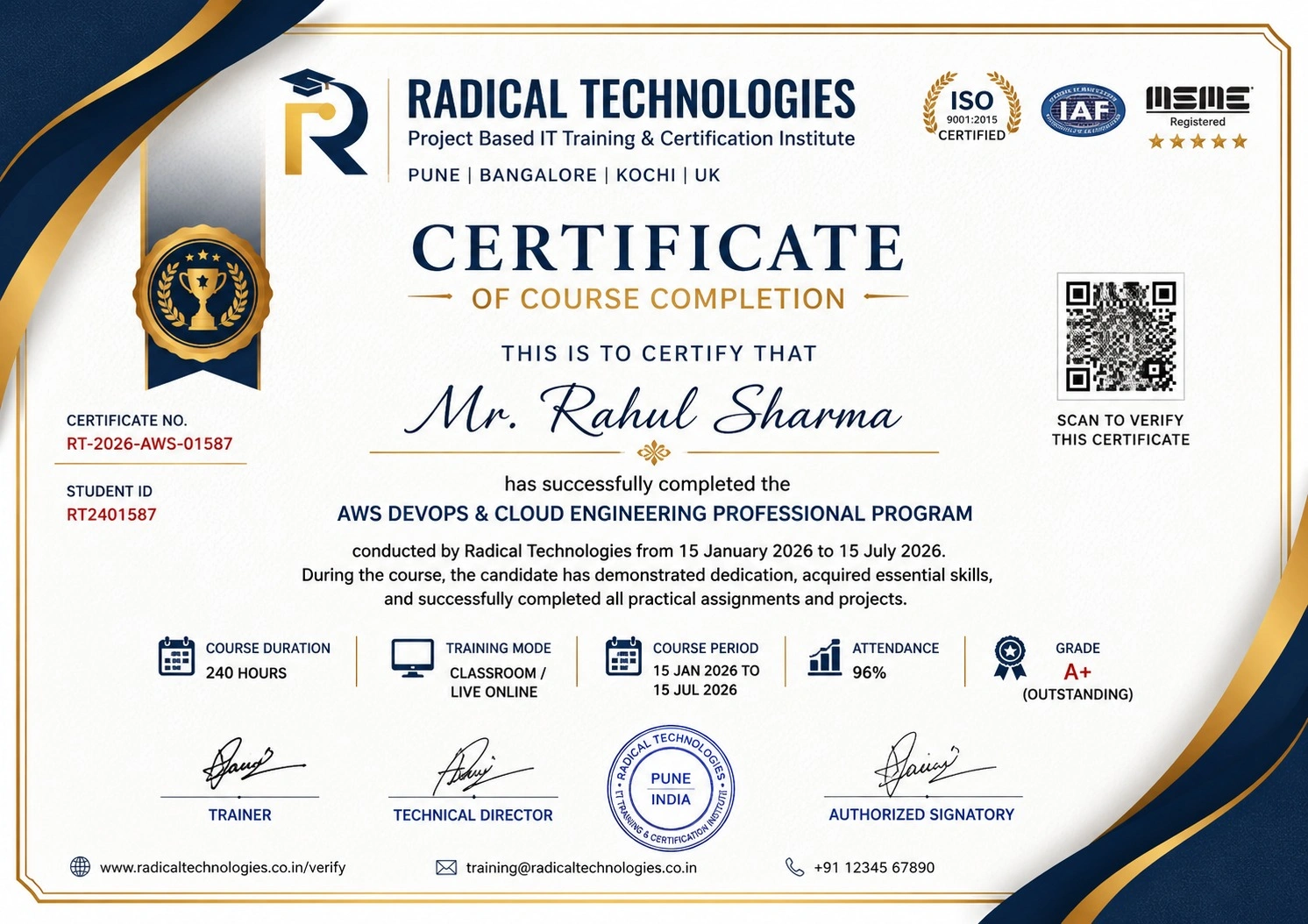
Recommended Certifications
Career Services
Our placement assistance program prepares candidates for opportunities with cloud consulting companies, AWS Advanced Tier Partners, managed service providers (MSPs), system integrators, product companies, startups, financial institutions, healthcare organizations, retail enterprises, and Fortune 500 companies.
Placement Support Includes:
- Career counseling and cloud skill-gap assessment.
- Enterprise-level AWS projects and hands-on lab experience.
- Resume and LinkedIn profile optimization.
- Technical, managerial, and HR mock interviews.
- Communication and presentation skill enhancement.
- Regular interview scheduling through our network of 850+ hiring partners.
- Guidance on certification planning, interview follow-ups, offer evaluation, and salary negotiation.
- Continued placement assistance until candidates secure suitable employment, subject to individual performance, market demand, and employer hiring requirements.
Career Support
Join our Brush-up Session & get support until you find a job!
Get StartedRadical Learning Eco-System
Exam Simulator
Cloud SandBox
Hands-on Cloud Lab
Developer Coding Ground
Student Reviews
Course Rating





Our Alumni Work At














AWS Certified Solutions Architect – Associate Course Certification with Training in Kochi
Related Courses
AWS Certified Solutions Architect – Associate Course In Other Cities
Online Batches Available For These Areas
Ambegaon Budruk | Aundh | Baner | Bavdhan Khurd | Bavdhan Budruk | Balewadi | Shivajinagar | Bibvewadi | Bhugaon | Bhukum | Dhankawadi | Dhanori | Dhayari | Erandwane | Fursungi | Ghorpadi | Hadapsar | Hingne Khurd | Karve Nagar | Kalas | Katraj | Khadki | Kharadi | Kondhwa | Koregaon Park | Kothrud | Lohagaon | Manjri | Markal | Mohammed Wadi | Mundhwa | Nanded | Parvati Hill | Panmala | Pashan | Pirangut | Shivane | Sus | Undri | Vishrantwadi | Vitthalwadi | Vadgaon Khurd | Vadgaon Budruk | Vadgaon Sheri | Wagholi | Wanwadi | Warje | Yerwada | Akurdi | Bhosari | Chakan | Charholi Budruk | Chikhli | Chimbali | Chinchwad | Dapodi | Dehu Road | Dighi | Dudulgaon | Hinjawadi | Kalewadi | Kasarwadi | Maan | Moshi | Phugewadi | Pimple Gurav | Pimple Nilakh | Pimple Saudagar | Pimpri | Ravet | Rahatani | Sangvi | Talawade | Tathawade | Thergaon | Wakad
AWS Certified Solutions Architect – Associate
IT Training Programme
100% placement assistance