Radical Technologies
uncategorised
★★★★★
(2,095 ratings)  50,000+ Student

SELENIUM TRAINING IN KOCHI

Selenium is a new generation automation testing tool to automate web based application/Mobile application. It is also the core technology in countless other browser automation tools, APIs and frameworks. In the current competitive world, manual testing is getting obsolete, because of the time to market hence companies looking for technical professionals who can handle Automation efficiently which result in cost reduction. It’s open source tool, evolving day by day with the help of automation experts. Hence tool has a bright future in long run.

RT
Radical Technologies
50,000+ English 10 weeks Weekdays / Weekends Classroom / Online / Corporate
Online / Classroom

SELENIUM TRAINING IN KOCHI

IT Training Programme

Duration 10 weeks
Batch Type Weekdays / Weekends
Mode of Training Classroom / Online / Corporate
Locations Pune, Bangalore, Kochi
Language English
Certification Globally Recognized
Call Now

100% placement assistance

Enquire Now

Get course fees, batch dates & a callback

We never share your details.

What you'll learn

Understand core concepts and architecture from the ground up
Get hands-on with the tools used by working professionals
Build real-world projects you can add to your portfolio
Learn industry best practices and coding standards
Practice with real datasets and real-world scenarios
Prepare for certification and technical interviews
Work on collaborative, team-based exercises
Apply performance tuning and optimization techniques
Understand how the technology fits into a larger ecosystem
Complete assignments reviewed by mentors

Programme Overview

14 sections covering the complete curriculum — a single, progressive learning arc.

10 weeks
Training Duration
14
Core Modules
165
Total Lessons
4.6★
Average Rating
50K+
Students Trained
01

Foundations & Core Concepts

Get hands-on with the fundamentals and architecture — the building blocks for everything that follows.

Fundamentals Architecture Setup
02

Hands-On Practical Training

Work through real exercises and assignments designed to mirror what you will do on the job.

Practicals Assignments Labs
03

Real-World Projects

Apply what you have learned to end-to-end projects that go straight into your portfolio.

Projects Portfolio Case Studies
04

Advanced Techniques

Go beyond the basics with advanced concepts, integrations and production-grade practices.

Advanced Integration Best Practices
05

Ecosystem Integration

Understand how this technology connects with the broader tools and platforms used in the industry.

Ecosystem Tools Platforms
06

Performance & Interview Prep

Master optimization techniques and prepare for the technical interview questions employers actually ask.

Optimization Interview Prep Certification

Who is this programme for?

Whether you're already writing code, working with data, or supporting applications today — this programme is built to take you into a uncategorised role.

Software Developers

Engineers who want to add this skill set to their toolkit

Analysts & Consultants

Professionals moving into a more technical, hands-on role

IT Professionals

System admins and support engineers upskilling into a new domain

Fresh Graduates

CS/IT graduates aiming for a job-ready technical role

Course Curriculum

14 sections  •  165 lessons  •  10 weeks

01 SYLLABUS

JAVA +Selenium

Basics of Manual Testing

Introduction
Types of Testing
Development life cycle
Testing life cycle
Bug life cycle
Different development models
Water fall
Agile

Core Java

Introduction
Java programming Keywords
Oops concepts
Abstraction
Polymorphism
Encapsulation
Inheritance
Method overloading & Method overriding
Literals
Data types
Local and global variables
Classes & objects
Access specifies
Creating & Importing packages
Exception Handling
Interface
Collection Framework
ArrayList
LinkList
HashMap
HashSet
TreeSet

Automation need

Why
When
How

Eclipse

Configuring Eclipse
Write & compile Java programs
Debug java code
Run Java code
Write and Execute sample java programs

TestNG

Introduction
Configuring TestNG
Annotations
Composing tests
Assertions
Generating reports
Trouble shooting

Basics of Selenium

Introduction
Why selenium
Selenium Vs Other automation tool (QTP)
Selenium components
Selenium Core
Selenium IDE
Selenium RC (1.0)
Selenium Webdriver (3.0)
Selenium Grid

Selenium IDE

Introduction
IDE features
Installing & configuring IDE
Inspecting elements in IDE
Recording and playback the scripts
Building test cases
Running test cases
Debugging

Selenium Webdriver (3.0)

Introduction
Configuring Webdriver with Eclipse
Create project
Create and run tests
Executing tests on multiple browsers Debugging tests
IE
Firefox
Chrome
Using locators (Id, Class, Name, xpath, css etc)
Choosing locating Strategies
Handling Security popups / Alerts / Dialog boxes
Error Handling
Working with various Web Elements
Buttons
Input boxes
List
Links
Radio buttons
Check boxes
Comboboxes /dropdowns

Advanced Selenium Webdriver

Complex xpath construction(relative xpath, xpath for tables)
Attachment using native window
Handling iFrame/Frame
File Upload/Download
Screenshots
UI Mapping/Object Map
Data Handling
Parameterization
Waits in Selenium
Implicit wait
Explicit wait.
Automating Web Table and creating generic library.
Action Class

Selenium Grid

Hub and node concepts
Configuration of selenium Grid
Executing test using Selenium Grid and TestNG

Automation Framework

What is Automation Framework?
Data Driven Framework
Keyword Driven Framework
Hybrid Framework
Page Object Model
Reading the data from external files (Excel)
Executing test in parallel using Selenium and TestNG
Hands on experience

Advanced Automation Framework Understanding

Selenium Integration with build tool. (MAVEN)
Database testing using selenium
Integration with Continuous Integration tool (Jenkins/Hudson)
Common Automation platform development for Desktop, REST api, Mobile Automation
02 What is selenium testing?
Selenium is a new generation automation testing tool to automate web based application/Mobile application.
It is also the core technology in countless other browser automation tools, APIs and frameworks.
03 Who should Learn selenium ?
Manual testers/developers/Quality analyst/White box testers/UI Testers
Engineers working on any other automation tool
Fresheres/College Graduates
Anyone who want to shift their career in the automation world.
04 Our plus points
You can repeat the missed session in the next batch
Institute trainers are open to support over whatsapp, phone, mail even after the completion of the course.
05 Why selenium as career path.
In the current competitive world, manual testing is getting obsolete, because of the time to market hence companies looking for technical professionals who can handle Automation efficiently which result in cost reduction.
It’s open source tool, evolving day by day with the help of automation experts. Hence tool has a bright future in long run.
06 Job opportunities in selenium
This technology have highest opportunity in the market after Java.
07 Packages n growth in selenium
You can expect handsome package as per your expertise. No limit.
08 Proj/Assignments/Scenarios
With the course content we develop the automation framework in the institute on a live website, which need to be refined, enhanced by students and present it to the trainer after the course. Trainer guides them to make it robust and reliable. You can gain the knowledge of at least 4+ years in Selenium after this course
09 L1 Tasks
1. Basic user account management (creating, modifying, and deleting users).
2. Password resets and account unlocks.
3. Basic file system navigation and management (creating, deleting, and modifying files and directories).
4. Basic troubleshooting of network connectivity issues.
5. Basic software installation and package management (installing and updating software packages).
6. Viewing system logs and checking for errors or warnings.
7. Running basic system health checks (CPU, memory, disk space).
8. Restarting services or daemons.
9. Monitoring system performance using basic tools (top, df, free).
10. Running basic commands to gather system information (uname, hostname, ifconfig).
10 L2 Tasks
1. Intermediate user account management (setting permissions, managing groups).
2. Configuring network interfaces and troubleshooting network connectivity issues.
3. Managing file system permissions and access control lists (ACLs).
4. Performing backups and restores of files and directories.
5. Installing and configuring system monitoring tools (Nagios, Zabbix).
6. Analyzing system logs for troubleshooting purposes.
7. Configuring and managing software repositories.
8. Configuring and managing system services (systemd, init.d).
9. Performing system updates and patch management.
10. Monitoring and managing system resources (CPU, memory, disk I/O).
11 L3 Tasks
1. Advanced user account management (LDAP integration, single sign-on).
2. Configuring and managing network services (DNS, DHCP, LDAP).
3. Configuring and managing storage solutions (RAID, LVM, NFS).
4. Implementing and managing security policies (firewall rules, SELinux).
5. Implementing and managing system backups and disaster recovery plans.
6. Configuring and managing virtualization platforms (KVM, VMware).
7. Performance tuning and optimization of system resources.
8. Implementing and managing high availability solutions (clustering, load balancing).
9. Automating system administration tasks using scripting (Bash, Python).
10. Managing system configurations using configuration management tools (Ansible, Puppet).
12 L1-L2 Transition Tasks
1. Learning basic shell scripting for automation tasks. 2. Understanding file system permissions and ownership. 3. Learning basic networking concepts (IP addressing, routing). 4. Learning how to use package management tools effectively. 5. Familiarizing with common Linux commands and utilities. 6. Understanding basic system architecture and components. 7. Learning basic troubleshooting techniques and methodologies. 8. Familiarizing with basic security principles and best practices. 9. Learning how to interpret system logs and diagnostic output. 10. Understanding the role and importance of system backups and restores.
13 L2-L3 Transition Tasks
1. Advanced scripting and automation techniques (error handling, loops).
2. Understanding advanced networking concepts (VLANs, subnetting).
3. Familiarizing with advanced storage technologies (SAN, NAS).
4. Learning advanced security concepts and techniques (encryption, PKI).
5. Understanding advanced system performance tuning techniques.
6. Learning advanced troubleshooting methodologies (root cause analysis).
7. Implementing and managing virtualization and cloud technologies.
8. Configuring and managing advanced network services (VPN, IDS/IPS).
9. Implementing and managing containerization technologies (Docker, Kubernetes).
10. Understanding enterprise-level IT governance and compliance requirements.
14 L3 Tasks and Beyond
1. Designing and implementing complex IT infrastructure solutions. 2. Architecting and implementing highly available and scalable systems. 3. Developing and implementing disaster recovery and business continuity plans. 4. Conducting security audits and vulnerability assessments. 5. Implementing and managing advanced monitoring and alerting systems. 6. Developing custom automation solutions tailored to specific business needs. 7. Providing leadership and mentorship to junior team members. 8. Collaborating with other IT teams on cross-functional projects. 9. Evaluating new technologies and making recommendations for adoption. 10. Participating in industry conferences, workshops, and training programs.

Tools & Technologies

Every tool listed here is installed, configured and used in a hands-on lab session.

Core Tools

Hands-On Labs

Practical Environment

Industry-Standard Tools

Real-World Setup

Guided Exercises

Skill Building

Sample Datasets

Practice Material

Practice & Projects

Mini Projects

Applied Practice

Assignments

Mentor Reviewed

Doubt Sessions

Live Support

Career Readiness

Resume Building

Career Support

Mock Interviews

Interview Prep

Certification Prep

Global Recognition

Deployment & Delivery

Production Practices

Real-World Ready

Best Practices

Industry Standards

165+
Hands-On Lessons
14
Core Modules
10 weeks
Training Duration
100%
Practical Training

You don't just learn SELENIUM TRAINING IN KOCHI. You ship it.

Three major projects, each mirroring how production teams actually work — from guided foundations to a portfolio-ready capstone.

PROJECT // 01

Guided Foundation Project

→Requirement Analysis

→Guided Implementation

→Mentor Review

→Iteration

Foundation Beginner

Apply the fundamentals in a structured, mentor-reviewed project

Take the core concepts from the first half of the curriculum and apply them to a realistic scenario, with guidance and feedback from your mentor at every step.

Structured project brief
Step-by-step implementation
Mentor feedback and review
Documented outcome
Stack Core Concepts Best Practices
PROJECT // 02

Applied Practice Project

→Scenario Design

→Independent Build

→Testing & Validation

→Peer Review

Applied Intermediate

Build a more independent project mirroring real production scenarios

Work through a project that combines multiple concepts from the curriculum, closer to how work is actually structured on the job — less hand-holding, more ownership.

End-to-end implementation
Testing and validation
Documentation
Peer/mentor review
Stack Applied Skills Testing
PROJECT // 03

Capstone Project

→Planning

→End-to-End Build

→Review & Refinement

→Presentation

Capstone Advanced

Take a project from requirements to a polished, portfolio-ready deliverable

Your final project — plan, build, test and present a complete solution using everything covered in the curriculum, reviewed by mentors before you graduate.

Complete working solution
Presentation-ready documentation
Mentor sign-off
Portfolio-ready deliverable
Stack Full Curriculum Portfolio

All 3 projects go directly into your portfolio & resume — reviewed by mentors before you graduate.

See Sample Project Reports

Upcoming Batches

No upcoming batches scheduled right now. Enquire to get notified.

Why Radical Technologies

Live Online Training
  • Highly practical oriented training
  • Installation support on your system
  • 24/7 Email and Phone support
  • 100% Placement Assistance
  • Global Certification Preparation
  • Trainer-Student Interactive Portal
  • Assignments and Projects by Mentors
Live Classroom Training
  • Weekend / Weekdays / Morning / Evening batches
  • 80:20 Practical and Theory ratio
  • Real-life Case Studies
  • Easy make-up for missed sessions
  • PSI | Kryterion | Redhat Test Centers
  • Lifetime Video Classroom Access (coming soon)
  • Resume Prep and Mock Interviews
Self-Paced Training
  • Learn 300+ courses at your own time
  • 50,000+ Satisfied Learners
  • Course Completion Certificate
  • Practical Labs available
  • Mentor Support available
  • Doubt Clearing Session available
  • 10% Discounted Global Certification

Like the Curriculum? Let's Get Started

Join 50,000+ students already enrolled at Radical Technologies

Enroll Now

Global Certification

Radical Technologies is the leading IT certification institute in Kochi, offering globally recognized certifications across various domains. With expert trainers and comprehensive materials, we ensure students gain in-depth knowledge and hands-on experience to excel in their careers. Our certification programs are tailored to meet industry standards — from cloud technologies to data science — empowering individuals to stay ahead in the ever-evolving tech landscape.
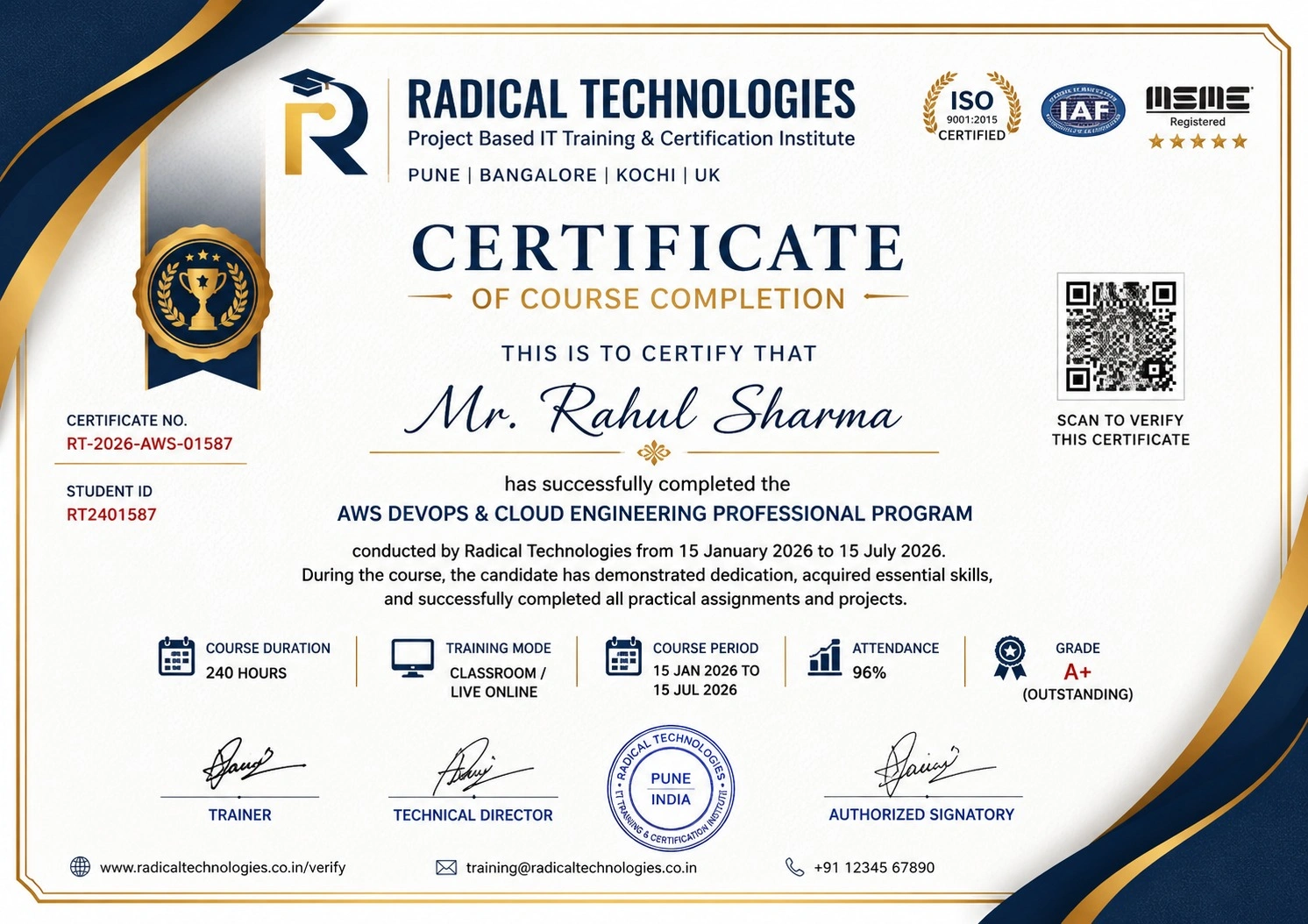
Certificate of Completion

Career Services

At Radical Technologies, we are committed to your success beyond the classroom. Our 100% Job Assistance program ensures that you are not only equipped with industry-relevant skills but also guided through the job placement process. With personalised resume building, interview preparation, and access to our extensive network of hiring partners, we help you take the next step confidently into your IT career.

Career Support

Course Completed? Need next steps?
Need Interview Supports?
Need Job Assistance?
Came from any other Institute?

Join our Brush-up Session & get support until you find a job!

Get Started

Radical Learning Eco-System

Exam Simulator

Cloud SandBox

Hands-on Cloud Lab

Developer Coding Ground

Student Reviews

4.6★
Average learner rating
50K+
Students trained
30+
Hiring companies alumni work at
100%
Placement assistance
4.6
★★★★★

Course Rating

★★★★★
73%
★★★★☆
19%
★★★☆☆
5%
★★☆☆☆
2%
★☆☆☆☆
1%

Our Alumni Work At
Accenture
Amazon
Avisys Services
Birlasoft
Capgemini
Catchpoint
Cognizant
Darwish Cybertech
DataVision
GiBots
Google
Groots Software
HCL Technologies
IBM
Info Gain
Infosys
ITCube Solutions
KPIT
L&T Infotech
Microsoft
Mphasis
mPhatek
Oracle
Quantbit Technologies
Saina Cloud
TCS
Tech Mahindra
Wipro
YASH Technologies
Zensar Technologies
Accenture
Amazon
Avisys Services
Birlasoft
Capgemini
Catchpoint
Cognizant
Darwish Cybertech
DataVision
GiBots
Google
Groots Software
HCL Technologies
IBM
Info Gain
Infosys
ITCube Solutions
KPIT
L&T Infotech
Microsoft
Mphasis
mPhatek
Oracle
Quantbit Technologies
Saina Cloud
TCS
Tech Mahindra
Wipro
YASH Technologies
Zensar Technologies

SELENIUM TRAINING IN KOCHI

Get a Call Back from Our Career Assistance Team

Request Callback